
Get the Original Window Sticker for any McLaren in Seconds
Enter any Mclaren VIN into our McLaren window sticker Lookup tool to find the factory build specs. View original MSRP, optional equipment, factory features, colors, engine specifications, safety ratings, fuel economy, and more.
What is a McLaren Window Sticker?
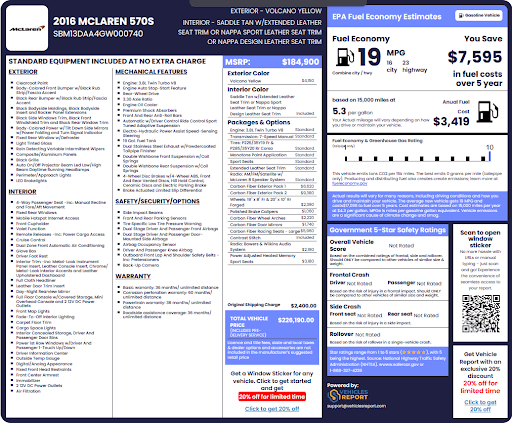
A McLaren window sticker is the label placed on a new McLaren before it leaves the dealership. It lists everything the factory put into that specific car, from the engine and trim level to the paint color and price.
This sticker matters a lot when buying or selling a used McLaren. It tells you exactly how the car was built and what it cost when it left the dealership, so there are no surprises.
Who Can Benefit from a McLaren Window Sticker lookup?
Looking up a McLaren window sticker by VIN helps many individuals and businesses get the right vehicle information they need.
McLaren Buyers
Confirm what the car came with from the factory before you pay.
McLaren Owners
Confirm your vehicle’s factory specs and options for resale purposes.
Dealerships
Get the original sticker details to support and justify used car pricing.
Insurance Providers
Verify factory equipment and vehicle value for coverage purposes.
What Information is Included in a McLaren Window Sticker?
A McLaren window sticker lookup by VIN gives you the full details of any vehicle’s original build specifications and information. Here’s what to expect:
General Information
This section covers the basic facts about the vehicle straight from the factory records.
Vehicle Description
This tells about the year, make, model, and trim level the car was built as.
Standard Equipment
Every McLaren comes with factory-installed features. This section lists all of them.
Interior Features
Shows factory-fitted cabin items like seating material, dashboard finish, and infotainment system.
Exterior Features
Lists body panels, wheel design, mirror finish, and any factory-installed exterior elements.
Mechanical Features
Covers the engine specs, drivetrain setup, suspension, steering system, brakes, and exhaust configuration.
Safety Features
Details standard safety tech like airbags, stability control, braking assist, and collision warning systems.
Options and Packages
These are the extra features added to the vehicle on top of the standard equipment.
Options
Individual add-ons the buyer chose, such as upgraded brakes, carbon fiber trim, or premium sound.
Packages
Bundled upgrades that came as a group, like a track pack or luxury interior bundle.
Colors
See the exact colors the vehicle was painted and trimmed with at the factory.
Exterior Color
Shows the factory paint color name applied to the outside of the car.
Interior Color
Lists the original cabin color, whether leather, Alcantara, or any special interior finish.
Vehicle Pricing
This section breaks down the full cost of the vehicle when it was first sold.
MSRP
The base price that the manufacturer set for the vehicle before adding any extras.
Packages and Options
The added cost of any extra features or bundles chosen at the time of purchase.
Original Shipping Charge
The fee paid to ship the vehicle from the factory to the dealership.
Total Vehicle Price
The full sticker price includes base MSRP, added options, and the shipping charge.
Fuel and Safety Ratings
Know how far the car goes on fuel and how it performed in safety tests.
EPA Fuel Economy Estimates
Shows the city, highway, and combined miles per gallon (MPG) ratings for the vehicle.
NHTSA Safety Ratings
Shows how the vehicle scored in government crash and rollover safety tests.
Warranty Information
The factory warranty tells you what McLaren covered when the car was brand new.
Basic Warranty
Covers most vehicle parts for a set time and mileage from the date of purchase.
Corrosion Perforation Warranty
Protects against rust holes forming through the body panels of the vehicle.
Powertrain Warranty
Covers the engine, transmission, and drivetrain parts for a longer period.
Roadside Assistance Coverage
Provides help if the car breaks down within the warranty period.
Other Information
There are a few more useful details found on a full McLaren window sticker.
Annual Fuel Cost
An estimate of how much money you will spend on fuel each year.
Greenhouse Gas Rating
Shows how much pollution the vehicle produces compared to other cars on the road.
Fuel Type
Confirms whether the car runs on premium gasoline, a hybrid setup, or another fuel source.
QR Code
A scannable code on the sticker that links to the window sticker digital form.
Why Lookup a McLaren Window Sticker by VIN?
A McLaren window sticker lookup gives buyers and sellers the factory build information behind any used vehicle on the market. Here’s why it’s crucial:
Buyers
Buyers can use the McLaren window sticker lookup to shop with confidence and full knowledge. Here’s how it helps:
Spot missing equipment
Find out if any factory features were removed or replaced, giving you the advantage of negotiating a lower price.
Know the original price
See what the car actually cost when it left the dealership. This will help you understand what the current value is.
Confirm the features
Make sure the car still has all the options it came with, to decide whether to get the car or not.
Sellers and Dealers
Sellers can use a McLaren window sticker to back up their listing with real factory data.
Speed up the sale
Buyers move faster to make an informed decision when they have all the facts in front of them.
Prove your asking price
Show buyers the original MSRP to support the price of the vehicle with confidence.
Build buyer trust
Displaying the McLaren window sticker shows you have nothing to hide about the car.
How to Get a McLaren Window Sticker by VIN
Looking up a McLaren window sticker takes just a few simple steps using the VIN number. Here’s how to get it done.
Enter the VIN
Find your 17-digit VIN and enter it into the form at the top of the page. You can also get the window sticker using the year, make, and model, or license plate.
Search VIN
Hit the search button to decode the VIN and pull up the factory records tied to that specific McLaren VIN number. Preview specs like year, make, and engine for free.
Get Your McLaren Window Sticker
After payment, your McLaren sticker will show up immediately, ready to view, download, save, or print right away as a PDF.
Enter the VIN
Find your 17-digit VIN and enter it into the form at the top of the page. You can also get the window sticker using the year, make, and model, or license plate.
Search VIN
Hit the search button to decode the VIN and pull up the factory records tied to that specific McLaren VIN number. Preview specs like year, make, and engine for free.
Get Your McLaren Window Sticker
After payment, your McLaren sticker will show up immediately, ready to view, download, save, or print right away as a PDF.
How to Find the VIN Number on a McLaren?
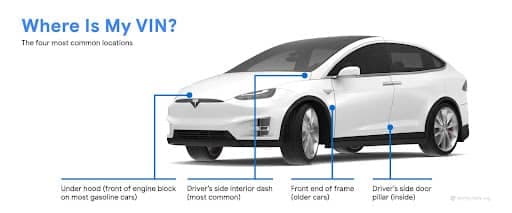
The VIN is a unique code with 17 characters that identifies each McLaren. Here are the most common places to find it.
- Driver’s Side Dashboard: Look through the windshield at the lower corner on the driver’s side.
- Driver’s Side Door Jamb: Open the door and check the sticker on the door frame area.
- Under the Hood: You can also have the VIN printed on a plate near the engine.
- Vehicle Documents: Check your title, registration, or insurance card for the VIN number.
Supported McLaren Models
Our McLaren window sticker lookup works for every McLaren model ever sold in North America. Here are some of the top models we support:
Get Window Stickers for Other Car Brands
You can also pull up window stickers for other vehicle brands using the same quick VIN lookup.
Explore Additional McLaren VIN Tools
Aside from the McLaren sticker lookup tools, here are other helpful tools to give you even more comprehensive vehicle records and details.
Lookup McLaren Window Sticker by VIN in Seconds
Get the full build specs of any McLaren. Use the VIN to pull up the original window sticker and see MSRP, standard features, options, colors, and more.
Frequently Asked Questions About McLaren Window Stickers
Can I get a McLaren window sticker using the VIN number?
Yes. Simply enter the VIN in the form above to get the factory window sticker for any McLaren. View original MSRP, options, standard equipment, enabling you to know exactly the car you’re buying.
Can I get a window sticker for a used McLaren?
Yes, our McLaren window sticker lookup tool allows you to enter a car’s VIN or year, make, and model to get a copy of the factory window sticker.
Why does the window sticker matter when buying a used McLaren?
A vehicle window sticker helps you confirm the car’s original MSRP, options, and features so you can check if the vehicle matches what the seller is telling you.
Can I download my McLaren window sticker as a PDF?
Yes. After running the McLaren window sticker search, you can view and save the sticker as a PDF to keep for your records. It’s all yours forever.