
Lookup Genesis Window Sticker: See Factory-Installed Features
Pull up the original Genesis window sticker within seconds. Enter the VIN to get accurate information on the factory MSRP, options, safety ratings, fuel economy, paint types, and every detail you need to know about the car.
What is a Genesis Window Sticker?
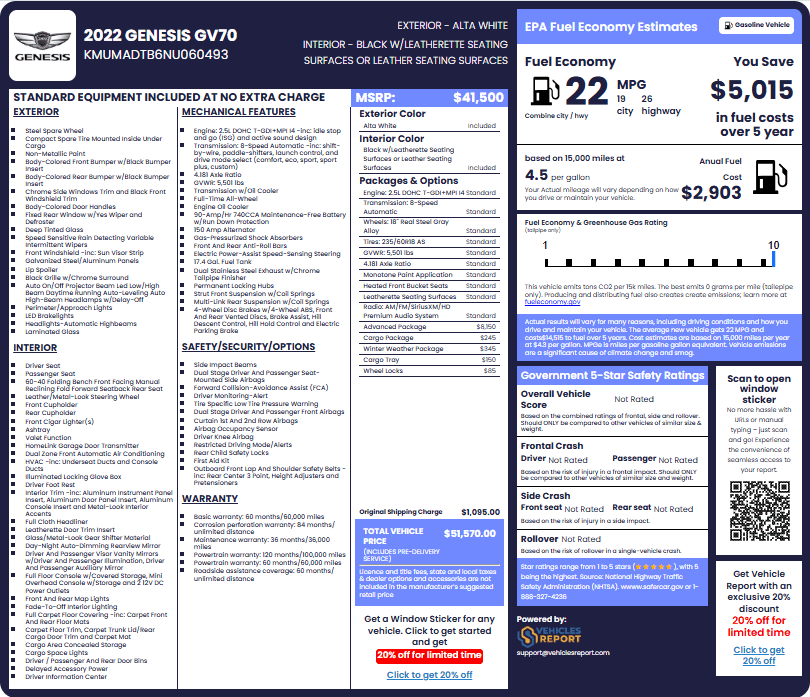
A Genesis window sticker, also known as a Genesis Monroney sticker, is an official factory document that’s affixed to every new Genesis when it leaves the production line. It records the vehicle’s model, trim, standard features, optional packages, colors, and the manufacturer’s Suggested Retail price.
For anyone buying or selling a used Genesis, this document carries real weight and helps buyers confirm what the car actually came with, so there are no surprises about missing features or misrepresented trims. Sellers and dealers use it to support their listings with facts that buyers can trust.
Who Does a Genesis Window Sticker Lookup Benefit?
A Genesis window sticker lookup is useful for several individuals dealing with used Genesis cars. Here are some beneficiaries:
Genesis Buyers
Confirm every factory feature on the car before committing to a purchase decision.
Genesis Owners
Review your car’s original factory build to better understand its current market value.
Dealerships
Access verified factory data to price, list, and sell used Genesis inventory with confidence.
Insurance Providers
Use confirmed original specs and factory pricing to support accurate vehicle coverage decisions.
What’s included in a Genesis Window Sticker?
Obtaining the Genesis window sticker by VIN provides a wide range of factory details and information. Here’s what to expect:
General Information
The top section of the sticker identifies the vehicle with the foundational details every buyer and seller needs to know.
Vehicle Description
Lists the year, make, model, and trim of the vehicle. For example, a 2023 Genesis G80 2.5T Standard AWD.
Standard Equipment
Every Genesis leaves the factory with a set of features already included, and this section lists every single one of them.
Interior Features
Covers items like heated and ventilated seats, leather upholstery, panoramic sunroof, digital instrument cluster, and ambient interior lighting.
Exterior Features
Lists factory-fitted details such as alloy wheels, chrome trim accents, power-folding mirrors, LED exterior lighting, and the crest grille design.
Mechanical Features
Details the installed engine, drivetrain, battery, suspension, steering system, braking type, exhaust design, and other mechanical components.
Safety Features
Shows the standard driver-assist systems, such as lane-keep assist, forward collision warning, blind-spot monitoring, and rear cross-traffic alert.
Options and Packages
Beyond the standard build, many Genesis vehicles were ordered with additional items and bundle packages.
Options
Individual add-ons chosen at purchase time such as a heads-up display, upgraded audio system, or specific wheel design.
Packages
Group bundles like the Advanced Package or Sport Package, which include several features sold together.
Colors
The Genesis window sticker captures both the exterior paint and the interior trim color originally used by the manufacturer.
Exterior Color
Shows the exact factory paint name. For example, Uyuni White or Savile Silver, so you can verify the color matches the original factory build record.
Interior Color
Lists the specific interior color, such as Havana Brown or Black, along with the material type, whether that is leather, suede, or another finish.
Vehicle Pricing
The pricing section gives a clear and itemized breakdown of what the Genesis car cost when it was first sold as a brand-new vehicle.
MSRP
The Manufacturer Suggested Retail Price is the base sticker price that Genesis set for the vehicle before any optional add-ons or packages.
Packages and Options
Each package and optional item is listed with its own individual price, so you can see exactly what was added to the vehicle.
Original Shipping Charge
Also called the destination charge, this is what Genesis charged to deliver the vehicle from the production facility to the selling dealership.
Total Vehicle Price
This is the full combined figure, including base MSRP, all options, all packages, and the shipping charge added together.
Fuel and Safety Ratings
Government agencies test every new vehicle before it reaches the public, and their official results are printed directly on the sticker for every buyer to see.
EPA Fuel Economy Estimates
The EPA-tested city and highway mileage figures show how far the car travels per gallon under standard conditions.
NHTSA Safety Ratings
The NHTSA crash test scores for frontal impact, side impact, and rollover resistance are listed here as star ratings out of a possible five stars.
Warranty Information
The sticker documents every warranty term that came attached to the car from the moment it was first sold.
Basic Warranty
Covers bumper-to-bumper protection that began when the vehicle was first purchased from an authorized Genesis dealership.
Corrosion Perforation Warranty
This covers rust damage that starts from inside the body panels and works its way through the exterior surface of the vehicle.
Powertrain Warranty
Protects major mechanical components like the engine and transmission for a defined period after the original sale date.
Roadside Assistance Coverage
Shows the full term of emergency roadside help that Genesis included as part of the original vehicle purchase agreement.
Other Information
A few additional details on the sticker give you a broader look at expected fuel costs and the vehicle’s environmental footprint.
Annual Fuel Cost
See EPA average national fuel prices, showing the projected yearly fuel expense for the vehicle under typical driving conditions.
Greenhouse Gas Rating
Shown on a scale from 1 to 10, this rating tells you how much carbon dioxide the vehicle produces compared to other cars.
Fuel Type
Confirms whether the vehicle runs on regular gasoline, premium gasoline, or electricity.
QR Code
A scannable QR code links directly to the car window sticker data online, tied to that specific model year.
Why Getting a Genesis Window Sticker Lookup is Crucial?
Whether you are on the buying or the selling side of a used Genesis transaction, a Genesis original window sticker lookup puts verified factory information in your hands before anything is signed. Here’s why it’s crucial:
Buyers
Walking into any used Genesis deal with the original sticker means you already know what the car was built with, how it was priced, and what it should include.
Know Exactly What You Are Buying
The sticker shows every factory feature on the car, so you are not relying on a seller’s memory or a listing that may leave out key details.
Negotiate with Factory Figures
Knowing the original MSRP and the value of every package gives you a solid foundation for discussing price rather than guessing at what the car is worth.
Spot Changes or Replacement Done
If the car has different wheels, seats, or technology than the sticker lists, something was changed after it left production.
Compare Two Similar Vehicles Side by Side
When choosing between two cars of the same model, the sticker shows which one was actually built with more features, even if they look identical.
Sellers and Dealers
Providing verified factory information builds buyer confidence and helps move inventory faster with fewer back-and-forth questions.
Support Your Asking Price With Facts
A sticker gives buyers a clear reason to understand why the car is priced the way it is, without needing a long explanation.
Create Listings Buyers Actually Trust
A car listing backed by original factory documentation stands out. Buyers are far more likely to reach out when the details are accurate and easy to verify.
Answer Buyer Questions on the Spot
When someone asks about the engine or what packages were included, the sticker gives you a reliable, documented answer right away.
Close Deals Faster
Showing the sticker upfront removes hesitation and helps move the conversation toward a decision.
How to Obtain Your Genesis Window Sticker by VIN
Obtaining your Genesis window sticker takes less than a minute. Just follow these three straightforward steps:
Enter the VIN
Find your 17-digit VIN and enter it into the form at the top of the page. You can also get the window sticker using the year, make, and model, or license plate.
Search VIN
Hit the search button to decode the VIN and pull up the factory records tied to that specific Genesis VIN number. Preview specs like year, make, and engine for free.
Get Your Genesis Window Sticker
After payment, your Genesis Monroney sticker will show up immediately, ready to view, download, save, or print right away as a PDF.
Enter the VIN
Find your 17-digit VIN and enter it into the form at the top of the page. You can also get the window sticker using the year, make, and model, or license plate.
Search VIN
Hit the search button to decode the VIN and pull up the factory records tied to that specific Genesis VIN number. Preview specs like year, make, and engine for free.
Get Your Genesis Window Sticker
After payment, your Genesis Monroney sticker will show up immediately, ready to view, download, save, or print right away as a PDF.
Where Can I Find My Genesis VIN Number?
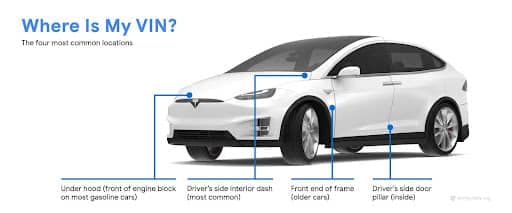
The VIN is a 17-character code that is unique to your specific vehicle. You can find it in several common spots, including:
- Dashboard (Driver’s Side): Look through the windshield at the lower-left corner of the dashboard for a small metal plate with the VIN.
- Driver’s Door Jamb: Open the driver’s door and check the door frame where it latches shut for a sticker showing the VIN and other details.
- Engine Compartment: The VIN is also stamped or printed on a plate inside the engine bay, typically near the firewall or along the driver’s side strut tower.
- Vehicle Documents: Your registration certificate, insurance card, and vehicle title all carry the full VIN. If the car is not nearby, checking your paperwork is the fastest way to find the number you need.
We Cover All Genesis Vehicle Types
We can look up window stickers for any Genesis model available. Here are some top popular models:
Get Window Stickers for Other Makes
You can pull original factory window stickers for many other popular vehicle brands, including.
Explore Other Helpful Genesis VIN Tools
These tools give you an even deeper look at your vehicle’s history, safety recalls, and other information.
VIN Decoder
Decode any VIN to verify vehicle specs like year, make, model, trim, engine, and more.
Vehicle Recall
Check if there are any open manufacturer safety recalls associated with its VIN number.
License Plate Lookup
Use a license plate number to find vehicle history and retrieve sticker information.
Get Instant Genesis Window Sticker Lookup Now
Find the original window sticker for any Genesis by VIN. View original MSRP, pricing breakdown, standard features, options, colors, and fuel economy, before you buy, sell, or insure any Genesis vehicle.
FAQ About Genesis Window Stickers
Can I print my Genesis window sticker?
Yes, you can download your window sticker as a PDF, which is ready for printing and sharing with others.
Can I look up a Genesis window sticker for a used vehicle?
Yes. Even if the original label is no longer on the car, the factory sticker information is still accessible by getting a window sticker lookup by VIN.
Does the Genesis window sticker show the price I should pay today?
The sticker shows the original MSRP and the cost of each option when the car was first sold. It does not set the current used-car market price, but it gives you useful context for negotiations by showing what the vehicle was worth on the day it left the dealership.