
Check Saturn's Transmission & Specs Using VIN Decoder
Enter your Saturn’s VIN in the form below to uncover key factory details, including the original transmission type, engine configuration, trim level, and drivetrain setup. Decode your Saturn VIN number now!
What is a Saturn VIN?
A Saturn VIN is a 17-character identification code assigned to each vehicle at the time of manufacture. No two Saturn vehicles share the same VIN, even if they are the same model and year. You can utilize the VIN to look up the Saturn’s specifications.
Where to Find the VIN on a Saturn
Models such as the S-Series, Ion, Vue, Aura, Outlook, and Sky were produced with different engine options, gearboxes, and trim packages. The VIN confirms original factory specifications, including engine size, such as a 1.9L four-cylinder or 3.6L V6, manual or automatic transmission, front-wheel or all-wheel drive configuration, model year, assembly plant, and unique production number.
On the Vehicle
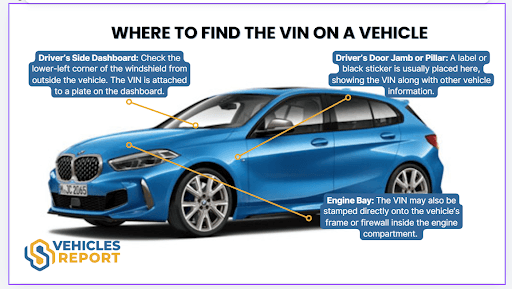
The VIN is printed on multiple parts of the vehicle and listed on official paperwork. Always make sure the VIN matches everywhere it appears.
- Dashboard: Lower-left corner of the windshield on the driver’s side, visible from outside.
- Driver’s Side Door Frame: Displayed on a certification sticker inside the door jamb.
- Engine Bay: Stamped onto a fixed structural area such as the firewall or radiator support.
On the Vehicle’s Paperworks
You can usually find the VIN in these locations:
- Vehicle registration
- Owner’s manual or service booklet
- Insurance documents
- Bill of sale
Who Needs to Decode the Saturn VIN
Whether buying, selling, insuring, or servicing a Saturn, decoding the VIN provides verified factory specifications and ownership history. A detailed vehicle history report helps private owners, used car buyers, dealers, and mechanics make informed decisions.
For Buyers
Decoding a Saturn VIN number reduces uncertainty and confirms the vehicle matches its advertised configuration and original factory build.
Confirm Factory Specifications
Verifies the exact model, such as Ion, Vue, Aura, Outlook, or Sky, including engine type, transmission, trim level, and drivetrain configuration.
Avoid Unexpected Issues
Review service history, accident records, title status, mileage consistency, recall information, and possible lien records before completing the purchase.
How to Decode a Saturn VIN
You can use our Saturn VIN decoder tool to decode the VIN and check its full specifications report. Follow these simple steps to get it done.
Find the VIN
Examine the car’s driver’s side doorjamb or the paperwork. If you can’t find them, you can ask the seller instead.
Fill Out the Form
Click on the form above to write down the VIN. Then, click on the button to submit the form.
Get the Report
Examine the preview page to see the specifications. If you need more information, click on the form to get more information.
Find the VIN
Examine the car’s driver’s side doorjamb or the paperwork. If you can’t find them, you can ask the seller instead.
Fill Out the Form
Click on the form above to write down the VIN. Then, click on the button to submit the form.
Get the Report
Examine the preview page to see the specifications. If you need more information, click on the form to get more information.
How to Read the Saturn VIN Number
The VIN on a Saturn vehicle consists of 17-digits of numbers and letters. Each VIN component represents different vehicle information. Here’s how you can read a vehicle’s VIN based on the classification: WMI, VDS, and VIS.
WMI (World Manufacturer Identifier)
Sample VIN: 1G8AJ55F27Z127618
- 1 = Country of origin: United States
- G = General Motors
- 8 = Saturn Corporation
VDS (Vehicle Descriptor Section)
–3: 1G8
- A = Model line: Ion
- J = Body style: Sedan
- 55 = Series/trim level
- F = Engine type: 2.2L 4-cylinder (Ecotec)
- 2 = Check Digit
VIS (Vehicle Identifier Section)
–8: AJ55F2
- 7 = Model year: 2007
- Z = Assembly plant: Spring Hill, Tennessee
- 127618 = Sequential production number
Why Choose Our Saturn VIN Decoder?
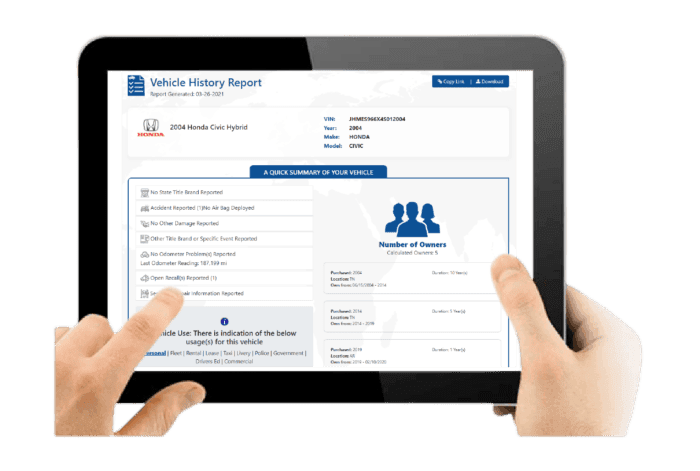
Our Saturn VIN decoder provides a detailed vehicle history report for only $19.99. From accident and auction records to title history, warranty data, and open recalls, the report helps verify a Saturn’s background.
Fast Results
There are no complicated steps or long delays. Enter the Saturn VIN, complete the form, and the full vehicle history report is generated in about seconds.
Support Whenever You Need It
Questions can come up at any time during the buying process. Our customer support team is available 24 hours a day, 7 days a week, to assist with any report-related concerns.
Auction Photos Included
If the Saturn was previously sold at auction, the report may include up to 10 genuine auction images. These photos provide useful insight into the vehicle’s past condition at the time of sale.
No Expiry on Your Report
Unlike some VIN decoder services that restrict access, your Saturn vehicle history report remains available whenever needed. There are no expiration dates and no extra charges to view the same report again.
Verify the Saturn's Trim by VIN
Know the car’s trim before you decide to purchase a used Saturn. Lookup Saturn’s VIN now and get the full specifications information.
What Will You Get From the Saturn History Report
A Saturn history report highlights the vehicle’s original specifications, ownership background, and key records that may influence reliability, safety, and long term ownership costs.
Vehicle Specifications
This section confirms how the Saturn was originally configured at the factory, including engine setup, trim designation, drivetrain layout, and practical equipment designed for everyday driving.
Core Vehicle Configuration
Includes engine options such as inline four cylinder EcoTec engines or V6 powertrains, automatic or manual transmission, FWD drivetrain layout, and models like Ion, Aura, Vue, Outlook, or Sky roadster.
Production and Pricing Details
Displays model year, manufacturing details from GM production plants, and original MSRP to verify factory installed packages, interior features, and technology equipment.
Damage Records
Damage records identify incidents that may affect structural integrity, mechanical components, or long term reliability.
Collision and Structural Damage
Highlights accident related repairs involving body panels, chassis alignment, or structural sections of the vehicle.
Fire and Environmental Damage
Shows flood, fire, hail, or severe weather damage recorded in official reporting databases associated with the VIN.
Accident Records
Accident history provides documented collision reports that may influence safety performance and resale value.
Accident Dates and Locations
Lists when accidents occurred and where they were officially recorded in reporting systems.
Structural and Safety Indicators
Highlights repairs affecting airbags, braking systems, traction control, or other safety related components.
Stolen Records
This check confirms whether the Saturn has ever been reported stolen in official vehicle databases.
Theft Status Verification
Confirms whether the VIN appears in national or international stolen vehicle reporting systems.
Theft Record Details
Provides theft report dates, locations, and recovery status when available.
Auction History
Auction history shows whether the Saturn appeared in dealer auctions, trade in channels, or wholesale resale markets.
Auction Sale Records
Displays auction dates, locations, and recorded sale prices from previous auction transactions.
Condition Reports and Photos
May include archived auction photos and vehicle condition summaries when available.
Sales History
Sales records track listing activity across dealerships and used vehicle marketplaces.
Listing and Sale Timeline
Shows when the Saturn was listed, sold, or relisted across vehicle marketplaces.
Resale Activity Patterns
Highlights repeated resale cycles that may indicate mechanical concerns or short ownership periods.
Service & Maintenance Records
Service history helps determine whether the Saturn received consistent maintenance during its ownership.
Routine Service Documentation
Includes scheduled maintenance records such as oil changes, inspections, and routine service visits.
Repair and Maintenance History
Shows documented repairs involving engines, transmissions, suspension components, or braking systems.
Title Check
The title check confirms the vehicle’s legal status and identifies branding that may affect resale or registration.
Title Status Confirmation
Indicates whether the title is clean or carries a branded designation.
Branded Title Details
Flags salvage, rebuilt, flood damaged, or lemon branding recorded in official title databases.
Mileage History
Mileage records help verify vehicle usage and detect irregular odometer patterns.
Recorded Odometer Entries
Displays historical mileage readings together with corresponding reporting dates.
Rollback Detection Indicators
Helps identify irregular mileage patterns or suspected odometer rollback events.
Lien or Loan Check
This section identifies financial claims that may affect ownership transfer.
Active Lien Status
Confirms whether a lender currently holds a legal financial interest in the vehicle.
Outstanding Loan Details
Shows unpaid balances that must be settled before completing a sale.
Ownership Records
Ownership history outlines how many individuals previously owned the Saturn.
Number of Previous Owners
Indicates the total number of recorded owners associated with the VIN.
Ownership Duration and Region
Shows ownership timelines and registration regions while protecting personal information.
Recall Information
Recall information confirms whether Saturn issued safety recalls for the vehicle.
Recall Notice Details
Lists recall dates, affected components, and reasons for manufacturer issued safety notices.
Repair Completion Status
Confirms whether recall related repairs were completed and properly documented.
Decode VIN From Other Makes
Click on the options on the list below to decode the car you desired. We cover a wide range of car makes aside from Saturn.
Check Other Services
Want to get more information about the vehicle? Use our other services to unreveal hidden information about the vehicle.
Decode the Saturn VIN Before Buying
Be sure to know the car’s ins and out especially when you are buying a used car like a Saturn. Lookup Saturn’s VIN to see the complete specifications information and get the vehicle history report.
FAQs About Saturn VIN Decoder
How do I tell what model Saturn I have?
To determine your Saturn model, such as SL, SL1, SL2, Ion, or Vue, locate the 17-character Vehicle Identification Number (VIN) on the driver’s side dashboard or inside the door jamb. The 8th character identifies the engine or model variant and can be interpreted using a reliable VIN decoder.
What is the difference between the Saturn Model 1 and 2?
The main differences between the Sega Saturn Model 1 and Model 2 are found in their design and internal layout. The 1994 Model 1 features oval-shaped buttons, a CD access indicator light, and in some versions, stronger audio output. The 1996 Model 2 has round buttons, a simplified single-board internal design, and is generally easier to modify.
Can you tell the car model by VIN?
Yes, a 17-character Vehicle Identification Number (VIN) can be used to confirm a vehicle’s exact make, model, model year, engine type, and manufacturing plant. Characters 4 through 8 describe the model, body style, and engine configuration, while the 10th character represents the model year.