
Examine Hyundai's Details & Specs by VIN Decoder
The problem with purchasing a used Hyundai sometimes lies in the transmission, and the fact that Hyundai is one of the most stolen vehicles. That is why it is crucial to decode the VIN to check the vehicle’s specifications and records, such as theft, auction, damage, and more!
What is a Hyundai VIN?
A Hyundai VIN, or Vehicle Identification Number, is a unique 17-character code assigned to every Hyundai during production. It works as the vehicle’s official identity to distinguish one from another, even though it has the same year, model, and trim.
Where to Find the VIN on a Hyundai
The VIN contains details such as the country of manufacture, model line (Elantra, Sonata, Tucson, Santa Fe, Palisade, Ioniq, etc.), engine type, trim level, production year, assembly plant, and serial number. Since Hyundai models often come in multiple trims with different engines, hybrid systems, or technology packages, the VIN helps identify one exact vehicle from thousands produced each year.
On the Vehicle’s Body
Finding the VIN on a Hyundai is simple. You can check both the vehicle itself and its official paperwork. Below are the most common locations.
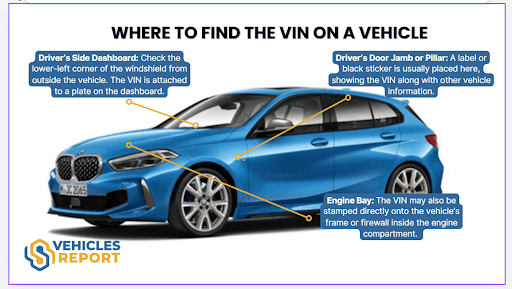
- Driver’s Side Dashboard: Look at the lower-left corner of the windshield on the driver’s side. The VIN is visible from outside where the dashboard meets the glass.
- Driver’s Door Jamb or Pillar: Open the driver’s door and check the certification label attached to the door frame. This sticker includes the VIN along with weight and manufacturing details.
- Engine Compartment: On some Hyundai models, the VIN may also be stamped onto the firewall or inner fender area inside the engine bay.
Vehicle Documents
Inspect the following areas carefully:
- Vehicle registration
- Owner’s manual or service records
- Bill of sale
Why Decoding the VIN Is Important
A Hyundai VIN plays an important role for buyers, sellers, insurers, and vehicle owners. Here are the reasons why a VIN decoder is one of the crucial things to do before purchasing a used Hyundai.
For Buyers
A VIN decoder allows buyers to verify core vehicle details before committing to a purchase. It provides insight into factory specifications and production data that may not be obvious from a listing alone.
Confirm Vehicle Specifications
Review the trim level, engine type, drivetrain, and model year to ensure the vehicle matches your expectations.
Reduce Purchase Risks
Cross-check vehicle details against seller claims to avoid misrepresentation or undisclosed issues.
How to Decode the Hyundai VIN?
To decode the Hyundai VIN, you can follow these simple steps below.
Find the VIN
Check on the vehicle’s doorjamb or on its paperwork. If you can’t find them, ask the seller.
Fill in the Form
Once you have the VIN, click on the form above and then click on the button.
Get the Report
Examine the preview page where you can see the car’s complete specifications information. Need more data? Proceed to payment to get the vehicle report.
Find the VIN
Check on the vehicle’s doorjamb or on its paperwork. If you can’t find them, ask the seller.
Fill in the Form
Once you have the VIN, click on the form above and then click on the button.
Get the Report
Examine the preview page where you can see the car’s complete specifications information. Need more data? Proceed to payment to get the vehicle report.
How to Read a Hyundai VIN?
The 17-character VIN is divided into three main sections: WMI, VDS, and VIS. Each section provides specific details about the vehicle’s origin, specifications, and production data.
WMI (World Manufacturer Identifier)
Sample: KM8K23AG3LU074313
- K = Country of origin: South Korea
- M8 = Manufacturer: Hyundai Motor Company
VDS (Vehicle Descriptor Section)
–3: KM8
- K2 = Model line: Hyundai Kona
- 3 = Body style: 4-door crossover or SUV
- A = Engine type: 2.0L 4-cylinder
- G = Restraint or safety system
- 3 = Check digit used to validate the VIN
VIS (Vehicle Identifier Section)
–8: K23AG3
- L = Model year: 2020
- U = Assembly plant: Ulsan, South Korea
- 074313 = Sequential production number unique to the vehicle
Why Use Our Hyundai VIN Decoder?
Buying or selling a Hyundai without reviewing its background can lead to unexpected expenses. Our Hyundai VIN Decoder provides verified factory specifications and comprehensive vehicle history records, helping you make a more informed decision.
Fast Process
Enter the 17-character Hyundai VIN and receive your vehicle history report within seconds. The process is secure, easy to follow, and built to deliver accurate information quickly, whether you are checking an Elantra, Sonata, Tucson, Santa Fe, Palisade, Kona, or Ioniq.
Responsive Support 24/7
Have questions about your report? Our support team is available around the clock. Whether you need clarification on accident history, ownership records, or specific trim and engine details, assistance is always available.
Auction Photos When Available
If the Hyundai was previously sold at auction, the report may include up to ten archived auction photos. These images provide additional insight into the vehicle’s prior condition, including visible damage or cosmetic changes.
Report With No Expiration
The Hyundai vehicle history report remains accessible without time limits. You can download, save, or review it whenever needed, especially helpful when comparing multiple vehicles or revisiting details before finalising a purchase.
Decode Any Hyundai VIN
Select the Hyundai model you want to check below and access its factory specifications and background records in minutes.
What Will You Get From the Hyundai History Report?
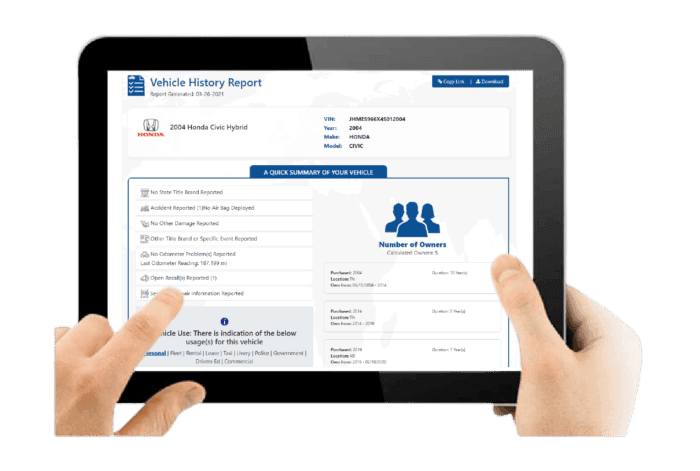
After decoding the VIN, you will receive a detailed Hyundai vehicle history report covering essential background information before purchase.
Vehicle Specifications
This section outlines the Hyundai’s original factory configuration to confirm performance, fuel efficiency, trim features, and overall suitability for daily commuting or family use.
Core Vehicle Configuration
Includes engine type, fuel type, drivetrain such as FWD or AWD, country of origin, and trim level.
Production and Pricing Details
Displays model year, assembly plant, and original MSRP to verify factory specifications.
Damage Records
Damage records reveal previously reported incidents that may affect structural integrity, safety systems, or overall reliability.
Collision and Structural Damage
Identifies accident-related damage that could impact frame structure or vehicle alignment.
Fire and Environmental Damage
Shows flood, fire, hail, or other environmental incidents recorded under the VIN.
Accident Records
Accident history provides documented collision events that may influence safety performance and long-term durability.
Accident Dates and Locations
Lists when accidents occurred and where they were officially reported.
Structural and Safety Indicators
Highlights potential repair areas that may affect driving stability and occupant protection systems.
Stolen Records
This check confirms whether the Hyundai has ever been reported stolen, helping reduce legal and financial risks.
Theft Status Verification
Confirms past or current stolen vehicle reports linked to the VIN.
Theft Record Details
Provides reported theft dates and locations for verification purposes.
Auction History
Auction history shows whether the Hyundai was previously sold through wholesale channels due to trade-ins, repossession, lease returns, or damage.
Auction Sale Records
Displays auction dates, locations, and final sale prices.
Condition Reports and Photos
May include listed vehicle condition summaries and archived auction images when available.
Sales History
Sales records track listing activity over time, helping identify repeated resale attempts or pricing inconsistencies.
Listing and Sale Timeline
Shows when the Hyundai was listed, sold, or relisted.
Resale Activity Patterns
Highlights short-term listing cycles that may suggest underlying issues.
Service & Maintenance Records
Service history demonstrates how consistently the Hyundai was maintained, which is essential for reliability and long-term performance.
Routine Service Documentation
Includes oil changes, scheduled maintenance, and service dates.
Repair and Maintenance History
Shows documented repairs and replacement of major components such as transmission, engine parts, or braking systems.
Title Check
The title check verifies the Hyundai’s legal status and identifies branding that may affect resale value or registration.
Title Status Confirmation
Indicates whether the title is clean or branded.
Branded Title Details
Flags salvage, rebuilt, flood-damaged, or lemon designations in official records.
Mileage History
Mileage records provide historical odometer readings to confirm usage patterns and detect possible discrepancies.
Recorded Odometer Entries
Displays mileage readings with corresponding reporting dates.
Rollback Detection Indicators
Helps identify irregular mileage patterns or potential odometer tampering.
Lien or Loan Check
This section identifies outstanding financial obligations that could affect ownership transfer.
Active Lien Status
Confirms whether a lender holds a legal claim on the vehicle.
Outstanding Loan Details
Shows unpaid balances that must be settled before completing the transaction.
Ownership Records
Ownership history outlines how many individuals previously owned the Hyundai and how frequently it changed hands.
Number of Previous Owners
Indicates total recorded owners associated with the VIN.
Ownership Duration and Region
Shows ownership length and registration regions while protecting personal data.
Recall Information
Recall information confirms whether Hyundai has issued safety-related recalls and whether corrective actions were completed.
Recall Notice Details
Lists recall dates, affected components, and reasons for issuance.
Repair Completion Status
Confirms whether recall-related repairs were completed and properly documented.
Decode VIN From Other Makes
No Hyundai? No need to worry, we cover different makes below.
Check Other Services
You can use our other services to get more information about the vehicle.
Decode Your Hyundai VIN Now
Before finalizing any purchase or sale, make sure the Hyundai has not been reported stolen, severely damaged, or linked to unresolved recalls. Decode the VIN and get all the crucial car information.
FAQs About the Hyundai VIN Decoder
Can you check Hyundai’s warranty by VIN?
Yes, you can verify a Hyundai’s warranty status using its 17-character Vehicle Identification Number (VIN). Simply enter the VIN into our Hyundai VIN Decoder to access a vehicle report that includes warranty coverage details.
When did Hyundai go to a 7-year warranty?
In Australia, Hyundai introduced a 7-year unlimited kilometre warranty for passenger vehicles, applied to cars registered from 1 June 2025 onward. This coverage applies to eligible new Hyundai models, provided scheduled servicing is completed at authorised Hyundai dealerships.
How to check the Hyundai VIN number?
To check a Hyundai VIN, locate the 17-digit code on the driver’s side dashboard (visible through the windshield), on the driver’s door jamb label, inside the engine bay, or on official documents such as registration and insurance papers.
What does a Hyundai VIN reveal about its origin?
A Hyundai VIN reveals key production details through its 17-character structure. The first three characters, known as the World Manufacturer Identifier, indicate the country of manufacture, the manufacturer, and the vehicle type. The 11th character identifies the specific assembly plant where the vehicle was built.